MODULE 2: NEURAL CONTROL PERSONALIZATION
In this module, you will use the NMSM Pipeline Neural Control Personalization (NCP) tool. NCP fits a set of muscle synergies to your data that best matches experimental muscle activations and reproduces experimental joint moments. Like MTP, NCP also calculates muscle joint moments and tries to track experimental joint moments. The design variables in NCP however, are the activations themselves. Specifically, NCP calculates a set of synergy activations and synergy vectors that create muscle activations that produce the correct muscle forces. It does this with a cost function that tracks muscle activations from MTP, and experimental joint moments. Because NCP is calculating muscle forces, it is best to use the muscle model calibrated in MTP. The desired output of NCP is a set of muscle synergies that are “functional”, meaning when the muscle synergies are given to the model, they reproduce joint moments and can make the model walk.
It is important that synergies are functional for Treatment Optimization. In the next module, the forces generated by synergy-driven muscles will drive the motion of our gait model. We will then be able to change the muscle synergies to achieve our desired functional outcome for this stroke subject.
This calibration will be performed using ID joint moments, muscle moment arms, muscle-tendon lengths and velocities, and muscle activations (not excitations) generated by MTP. The interaction between tool settings, data, and models required to perform this module is shown in the figure below:
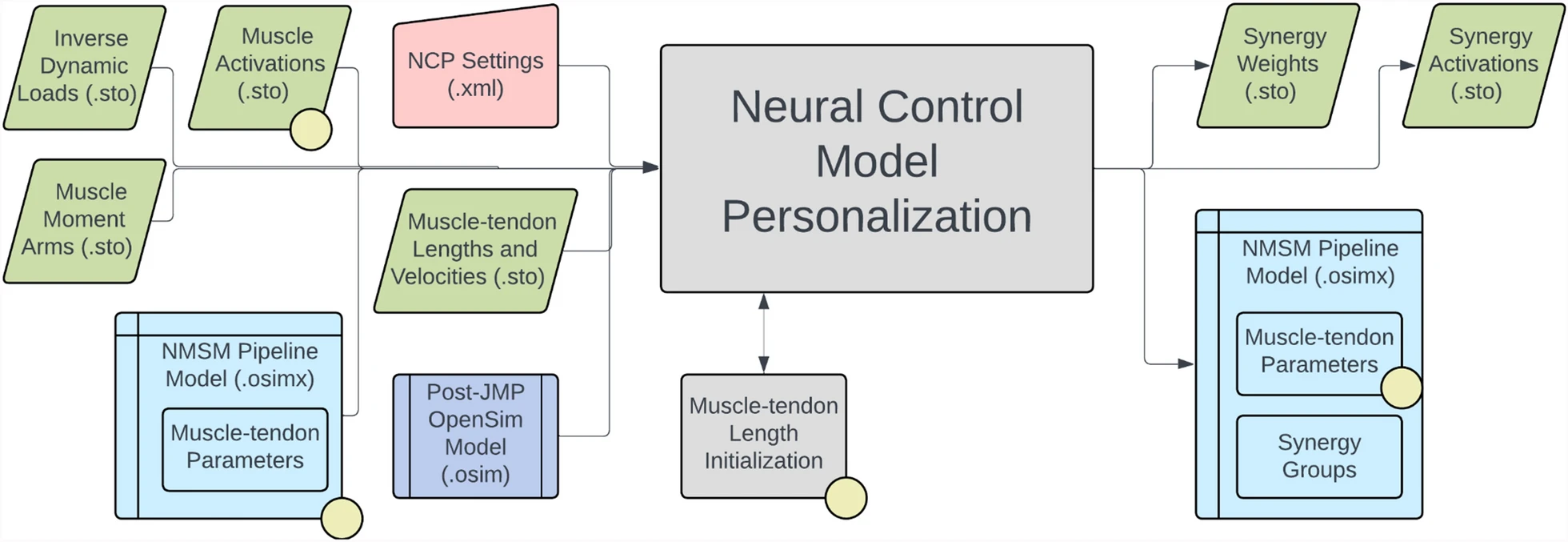
Because we ran MTP first, NCP will use the muscle model and muscle activations calibrated by MTP. The first task of this subproject will be to format your MTP results in the correct form for NCP. The second task will be to estimate how many synergies NCP should use. The third task will be to create an NCP settings file and fit your muscle synergies. The last task is to thoroughly analyze NCP results to diagnose this subject’s impairment.
Task 1: Format NCP inputs directory
Unlike MTP, NCP does support multiple synergy sets, so we can combine our MTP results into a single NCP run. Therefore, the first task in this subproject is to combine your left and right MTP results.
There is a premade MATLAB script NeuralControlPersonalization\CombineMTPResults.m that combines results for you. Open this script and input the paths to your right and left MTP results directories.
The script will concatenate the output joint moments and muscle activations from both runs, and write the concatenated file to a new directory NeuralControlPersonalization\mtpResultsCombined. It will also copy the osimx file from your left leg MTP results directory to mtpResultsCombined.
Task 2: Estimate how many synergies to use in NCP
At their core, muscle synergies are a mathematical decomposition of muscle activations. The more synergies you have, the better that decomposition will represent the original data. There are diminishing returns as more synergies are added, however. For a dataset with 16 EMG signals per leg, 5-6 synergies can typically represent more than 95% of the original data. Adding more synergies beyond that runs the risk of overfitting your experimental data which can make predicting new motions more difficult. To avoid overfitting our data, it is important to use a minimum set of synergies that represent the experimental data well.
The measure we use to quantify how well muscle synergies reproduce the original activations is called percentage of variance accounted for (%VAF), represented by the equation:
Where and are the experimental EMG data and the reconstructed EMG data, respectively. For neuromusculoskeletal modeling, we aim for our synergies to have 90-95% VAF.
For this task, we will conduct a VAF analysis on our EMG data to estimate how many synergies we should use in our NCP run. Open the script SynergyVafAnalysis.m and fill out the required variables. This function will conduct a synergy analysis for k=4, 5, 6 synergies, plot the reconstructed muscle activations for visualization, and output %VAF values for each number of synergies.
Choose the minimum number of synergies that produces 95% VAF for the left and right side. You will use this number of synergies for NCP.
Task 3: Run NCP
Step 1: Initial NCP Settings file
Load your post-JMP model
UF_Subject_4_Scaled_JMP.osiminto the OpenSim GUIOpen the Neural Control Personalization Tool GUI
Set the Input Osimx File to the Osimx file generated by your final left MTP run.
Set the Input Data Directory to
Preprocessing\preprocessedSet the Output Results Directory to
NeuralControlPersonalization\NCPResultsNoBilateralSet your coordinate list to all lower limb coordinates used in your previous MTP runs (left and right)
Set your Activation Muscle Groups* to every activation muscle group.
Set your Normalized Fiber Length Groups to every normalized fiber length group.
Keep MTLI disabled.
Set your MTP Results Directory to your combined MTP results directory.
Set your Synergy Set to
right_legandleft_legwith the number of synergies you decided on. Make sure both legs have the same number of synergies.QuestionIs it a good assumption for a stroke subject that both legs have the same number of synergies?
Expand for answer
There are studies that claim that synergy vectors originate in the spinal cord [(Roh et al., 2011; Ting et al., 2015)](/guides-and-publications/tutorials/advanced-tutorials/stroke-tutorial/references). Strokes affect only the brain and so we can assume that synergy weights do not change after stroke.However, other studies have claimed that synergy vectors do in fact change after stroke (Portilla-Jiménez et al., 2025).
Whether or not this is a good assumption or not should be explored more by validating experimentally the computationally designed treatments that use this assumption.
Save this settings file.
Open your settings file in a text editor.
Open your settings file in a text editor and edit the following cost terms inside of your
<RCNLCostTermSet>:<RCNLCostTerm>
<type>moment_tracking</type>
<is_enabled>true</is_enabled>
<max_allowable_error>2</max_allowable_error>
</RCNLCostTerm><RCNLCostTerm>
<type>activation_tracking</type>
<is_enabled>true</is_enabled>
<max_allowable_error>0.015</max_allowable_error>
</RCNLCostTerm>Copy and paste the following cost term into your
<RCNLCostTermSet>:<RCNLCostTerm>
<type>grouped_activations</type>
<is_enabled>true</is_enabled>
<max_allowable_error>0.05</max_allowable_error>
</RCNLCostTerm>Open the Matlab script
NeuralControlPersonalization\runNCP.
This NCP run will take about 600 iterations to converge.
Step 2: Experiment with bilateral symmetry
Your initial NCP run treated each leg as independent from the other. This might not be a realistic assumption, however. During a coordinated motion such as gait, your entire body is working together as a system, so it is likely that the synergies in your left and right leg are not acting independently from one another. This can be changed by including another cost term in NCP that adds coordination between the synergy sets in the body. This is called “bilateral symmetry”.
When decomposing a set of muscle activations into muscle synergies, we are representing muscle activations by a set of time varying commands that control activation timing, and time-invariant weights that control coordination between muscles. There is literature suggesting that the time varying commands are mostly based inside the brain, while the time invariant synergy vector weights are based inside the spinal cord. When using bilateral symmetry, you are imposing that the synergy vectors between each leg must be the same. We are assuming that because the stroke only affects the brain, the synergy vector weights in the spinal cord are unaffected. The synergy activations can still be different from each other. In other words, the timing in activations between the legs can be different, but the way in which muscles are coordinated with each other should stay the same between legs.
- Create a copy of your NCP settings file
- Change your Output Results Directory to
NCPResultsBilateral5Synergies. - Open your settings file in a text editor
- Set
<enforce_bilateral_symmetry>to true - This settings file will take longer to run than the previous settings file. As such, you are not required to run this settings file. Some premade results are inside
NCPResultsBilateral. - Comment out the line to run NCP, plot the premade results, and answer the following questions.
Deliverables:
- Fill out the following table with your %VAF values from task 2:
| Num Synergies | %VAF Right | %VAF Left |
|---|---|---|
| 4 | ||
| 5 | ||
| 6 |
In 1-2 sentences, explain how the NCP optimization works.
Briefly explain what muscle synergies are, and why we might want to use them in neuromusculoskeletal simulations instead of individual muscle activations.
Why do we not want to use more synergies than required to reach 95% VAF?
Answer the following questions about bilateral symmetry:
a. In 1-2 sentences, explain what bilateral symmetry is and why it’s important.
b. What %VAF did you get when running NCP with and without bilateral symmetry? Is this lower or higher than without bilateral symmetry? Does this result make sense?
c. How did using bilateral symmetry affect your tracking quality of joint moments or muscle activations?
d. Do you think that using bilateral symmetry is reasonable for a stroke subject?
Using the table created in CompareSynergyVectors.m, fill out the following table with the matching left leg synergy for each right leg synergy. Type N/A for boxes which you didn’t use that many synergies.
| Right Leg Synergy | Left Leg Synergy | Dot Product Value |
|---|---|---|
| 1 | ||
| 2 | ||
| 3 | ||
| 4 | ||
| 5 | ||
| 6 |
| Right Leg | Left Leg | ||||||
|---|---|---|---|---|---|---|---|
| Synergy Number | Magnitude | Number of Peaks | Location of peaks | Magnitude | Number of Peaks | Location of peaks | Similar shape? (yes/no) |
| 1 | |||||||
| 2 | |||||||
| 3 | |||||||
| 4 | |||||||
| 5 | |||||||
| 6 | |||||||
What you should be looking for here is distinct prominent peaks. If the synergy activation clearly increases to a local maximum and then decreases, that is a peak. Small noise in the synergy activation does not count as a peak.
The locations of the peaks should be presented as a percentage of the gait cycle. You don't need to be exact. Just round to the nearest 5% of the gait cycle.
To decide if two synergies have a similar shape, you should be comparing the number of peaks and the locations of the peaks between the legs. Keep in mind that the left side will have a 50% gait cycle time shift from the right side. For example, if right leg synergy 1 has two peaks at 10% and 40% of the gait cycle, a “similar” left leg synergy 1 would have two peaks at 60% and 90% of the gait cycle. If both the right and left leg synergies have peaks at the same percentage in gait cycle, they are not similar to each other.
- For the solution with bilateral symmetry, fill out the following table listing the primary muscles in each synergy. If a muscle has a synergy vector greater than 0.03 for a given synergy, write it in the table below.
| Synergy Number | Primary Muscles in Synergy Vector |
|---|---|
| 1 | |
| 2 | |
| 3 | |
| 4 | |
| 5 |
- Using the given table detailing muscle groups, fill out the below table with what muscle groups are most represented in each synergy.
| Synergy Number | Primary Muscle Groups in Synergy Vector |
|---|---|
| 1 | |
| 2 | |
| 3 | |
| 4 | |
| 5 |
Primary muscle groups and their corresponding muscles are listed below:
| Muscle Group | Muscles in Group |
|---|---|
| Hip Adductors | Addbrev, Addlong, Addmag |
| Hip Abductors | Glmax, Glmed, Glmin |
| Hip Rotators | Piri, Tfl, Gem, Quadfem |
| Hip Flexors | Iliacus, Psoas, Recfem, Sart |
| Hip Extensors | Bflh, Glmax, Semimem, Semiten |
| Knee Flexors | Bflh, Bfsh, Semimem, Semiten, Gaslat, Gasmed |
| Knee Extensors | Recfem, Vasint, Vaslat, Vasmed |
| Ankle Plantarflexors | Gaslat, Gasmed, Soleus |
| Ankle Dorsiflexors | Tibant, Edl, Ehl |
| Ankle Inverters/Everters | Edl, Ehl, Perbrev, Perlong, Tibpost, Fdl, Fhl |
Muscle synergies are often assigned a biomechanical function based on when in the gait cycle they are most active (Ting et al. 2015). Some common tasks assigned to synergies are:
a. Weight acceptance
b. Propulsion
c. Flexion
d. Leg swing
The figure below shows the approximate shape of these types of synergies.
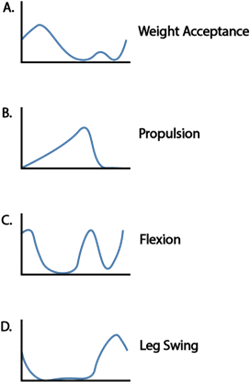
For the synergies with bilateral symmetry, fill out the following table with the function of each synergy. Reference the shapes of the synergy commands in the above figure. It is possible that multiple synergies serve the same function, or perhaps a mix of multiple functions.
| Synergy Number | Synergy Function |
|---|---|
| 1 | |
| 2 | |
| 3 | |
| 4 | |
| 5 |
With this subject, we observe impaired synergies, and compensatory synergies. Impaired synergies are on the affected side (right side in this case) and have a significantly lower activation than the matching synergy on the less-affected side. Compensatory synergies are on the affected side and have a larger magnitude than the corresponding synergy on the less-affected side.
a. Which synergy (or synergies) are impaired? What function do these synergies serve? What muscle groups are in these synergies?
b. Which synergy or synergies are compensatory? What functions do these synergies serve? What muscle groups are in these synergies?