Design Optimization
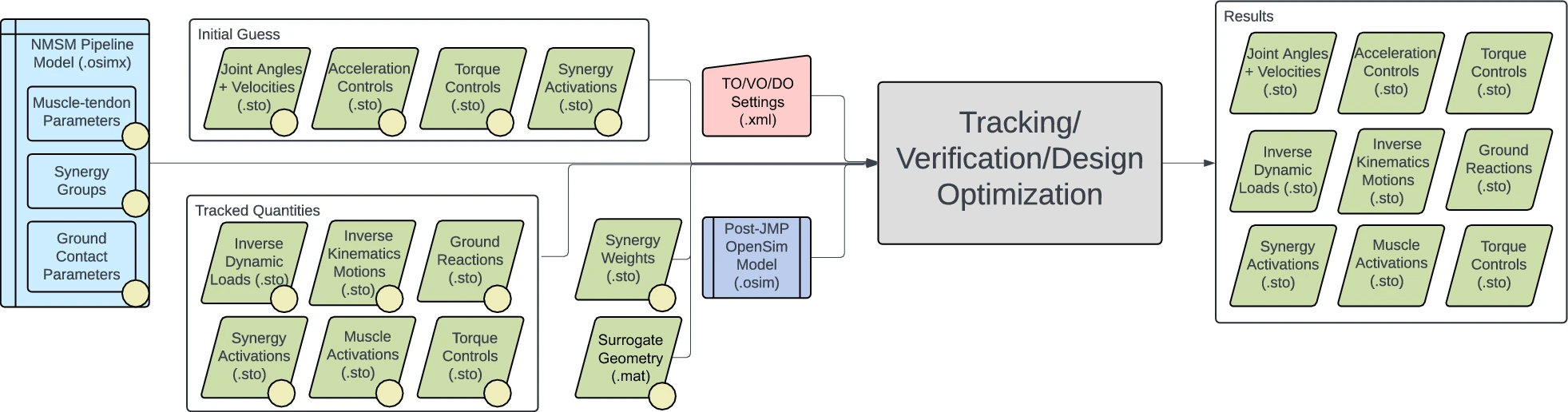
Design Optimization empowers researchers, clinicians, and practitioners to customize and tailor treatment strategies based on specific needs and goals. By allowing the modification of cost functions, path constraints, and terminal conditions, Design Optimization provides a flexible framework for exploring and optimizing control strategies, ultimately leading to optimized outcomes and improved patient care.
Inputs
- OpenSim model file (.osim)
- NMSM Pipeline model file (.osimx) (Optional)
- Verification Optimization results directory.
- This directory should be both the tracked quantities and initial guess directory for many applications.
- Sometimes you might want to run DO in two phases, where the results from one DO run are used as the initial guess for a subsequent DO run.
- GPOPS II settings file (.xml)
Outputs
- IKData: Joint angles
- IDData: Joint loads
- GRFData: Ground reactions
- accelerations.sto: State accelerations
- combinedActivations.sto: Muscle activations produced by synergy controls
- replacedExperimentalGroundReaction.sto: Modeled ground reactions with moments reported about the midfoot superior marker projected onto the ground
- states.sto: State coordinate positions and velocities
- torqueControls.sto: Torque control signals
- synergyCommands.sto: Time-varying synergy commands
- synergyWeights.sto: Time-invariant synergy weights
Free Final Time Information
DO supports free final time problems in which the final time of the motion can be changed. Free final time is important for many applications such as improving walking speed.
To use free final time, include the following line in your DO settings file.
<final_time_range>t1 t2</final_time_range>
where t1 is the lower bound of the allowable final times, and t2 is the upper bound of the allowable final times.
User Defined Treatment Design Inputs
User Defined Cost and Constraint Terms
Design Optimization allows for user defined cost and constraint terms. These user defined terms are defined by Matlab functions with the following format:
function cost = costTermName(values, modeledValues, auxdata, costTerm)
model = auxdata.model;
state = model.initSystem();
%% Insert your code here
cost = %%%%%
end
valuescontains positions, velocities, accelerations, and controls.modeledValuescontains values derived from the previous values struct such as joint loads, fiber lengths, ground reactions, etc...auxdatais the inputs struct that is parsed from your settings file.costTermis a struct that holds information about the cost term such as max allowable error.
For examples of user defined cost and constraint terms, go to the Treatment Optimization tutorials